PDKs
A Process Design Kit (PDK) connects your design to a specific fabrication process. It provides the components, layers, design rules, and simulation models needed to create manufacturable chips.
GDSFactory+ supports more than 50 photonic, electronic, RF, and mixed-signal processes.
- Choose a supported PDK
- Start from a sample project
- Configure a project manually
- Manage installed PDKs
Choose a PDK
Start with the foundry process and material platform required by your design. Then check which GDSFactory+ capabilities are available:
- Layout — fixed cells and parametric cells (PCells)
- DRC — design-rule checking for the fabrication process
- Models — circuit models for photonic or electrical simulation
In the tables below, ✅ means the capability is available and ➖ means it is not currently listed as supported.
Getting access
Open-source PDKs link directly to their repositories. Proprietary PDKs typically require an NDA and are distributed by the foundry or an MPW broker. Request access through the organization shown in the Distribution column.
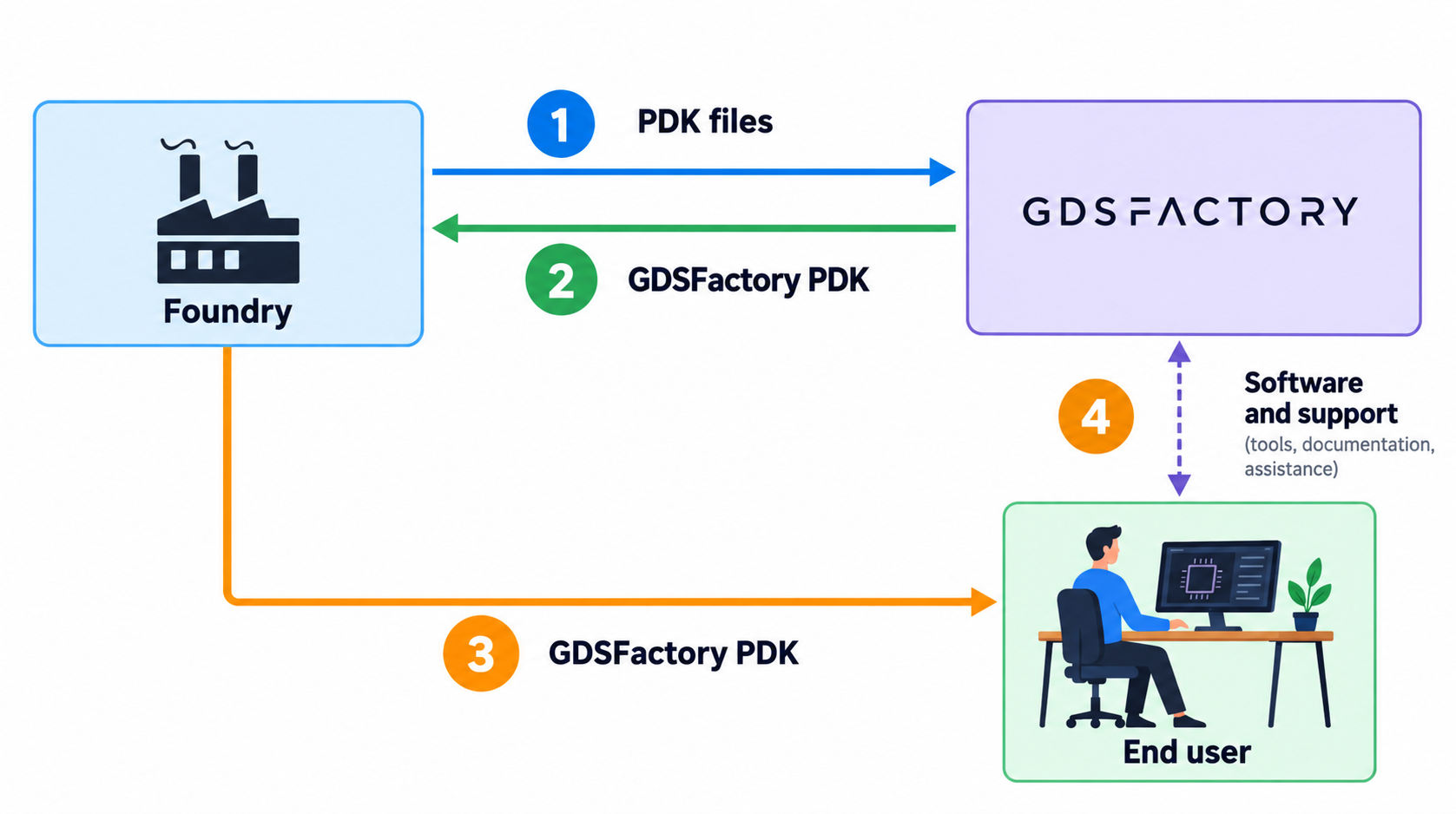
If you need help identifying the appropriate foundry contact, reach out to the GDSFactory team.
Start from a sample project
For a new design, start from the GDSFactory+ sample project supplied for your
PDK. It includes a preconfigured pyproject.toml with the required dependencies,
PDK integration, DRC process, and simulation settings.
This is the recommended path because it avoids duplicating process-specific configuration and lets you begin designing immediately. See PDK management for installation and project setup.
Supported PDKs
Photonics PDKs
| Foundry | Process | Platform | Layout | DRC | Models | Distribution |
|---|---|---|---|---|---|---|
| Tower - Open Light | PH18DA | SiPho | ✅ | ✅ | ✅ | Tower eBizz Portal |
| Tower - Open Light | PH18DAC | SiPho | ✅ | ✅ | ✅ | Tower eBizz Portal |
| Tower | PH18MA | SiPho | ✅ | ✅ | ✅ | Tower eBizz Portal |
| Tower | PH18MA_SL | SiPho | ✅ | ✅ | ✅ | Tower eBizz Portal |
| Tower | PH18MA_SL2 | SiPho | ✅ | ✅ | ✅ | Tower eBizz Portal |
| Tower | PH18MA_SL3 | SiPho | ✅ | ✅ | ✅ | Tower eBizz Portal |
| Tower | PH18MA_SL4 | SiPho | ✅ | ✅ | ✅ | Tower eBizz Portal |
| Tower | PH18MN | SiPho | ✅ | ✅ | ✅ | Tower eBizz Portal |
| Tower | PH18MCG | SiPho | ✅ | ✅ | ✅ | Tower eBizz Portal |
| Tower | PH18MCI | SiPho | ✅ | ✅ | ✅ | Tower eBizz Portal |
| Tower | TPS45 | SiPho | ✅ | ✅ | ✅ | Tower eBizz Portal |
| GlobalFoundries | AMF-GP | SiPho | ✅ | ✅ | ✅ | GF customer portal |
| GlobalFoundries | AMF-HP | SiPho | ✅ | ✅ | ✅ | GF customer portal |
| AIM Photonics | ACT | SiPho | ✅ | ✅ | ✅ | Email request to AIM Photonics |
| AIM Photonics | Qflex | SiPho | ✅ | ✅ | ✅ | Email request to AIM Photonics |
| Ligentec | AN800 | SiN | ✅ | ✅ | ✅ | Email request to Ligentec |
| Ligentec | AN350 | SiN | ✅ | ✅ | ✅ | Email request to Ligentec |
| HHI | III-V | ✅ | ✅ | ✅ | JePPIX | |
| Quantum Computing Inc. QCi | LN | TFLN | ✅ | ✅ | ✅ | Email request to QCi |
| CCraft | CLN Core | TFLN | ✅ | ➖ | ✅ | Email request to CCraft |
| CCraft | CLN Plus | TFLN | ✅ | ➖ | ✅ | Email request to CCraft |
| Luxtelligence | TFLN | ✅ | ➖ | ✅ | GitHub | |
| Silterra | Silterra | SiPho | ✅ | ✅ | ✅ | Email request to Silterra |
| IMEC Photonics | ISIP50G | SiPho | ✅ | ✅ | ✅ | Email request to IMEC |
| IMEC Photonics | ISIP200G | SiPho | ✅ | ✅ | ✅ | Email request to IMEC |
| Compoundtek | SiPho | ✅ | ➖ | ✅ | Email request to Compoundtek | |
| SiEPIC Ebeam UBC | Ebeam, SiPho | ✅ | ✅ | ✅ | GitHub | |
| Applied Nanotools ANT | SOI220 | Ebeam, SiPho | ✅ | ✅ | ✅ | Email request to Applied Nanotools |
| Applied Nanotools ANT | SiN400 | Ebeam, SiPho | ✅ | ✅ | ✅ | Email request to Applied Nanotools |
| Cornerstone | si220 C-band | SiPho | ✅ | ✅ | ✅ | GitHub |
| Cornerstone | si220 O-band | SiPho | ✅ | ✅ | ✅ | GitHub |
| Cornerstone | si340 | SiPho | ✅ | ✅ | ✅ | GitHub |
| Cornerstone | si500 | SiPho | ✅ | ✅ | ✅ | GitHub |
| Cornerstone | sin300 | SiN | ✅ | ✅ | ✅ | GitHub |
| Cornerstone | sin200 | SiN | ✅ | ✅ | ✅ | GitHub |
| Cornerstone | ge_on_si | Ge-on-Si | ✅ | ✅ | ➖ | GitHub |
| Cornerstone | si_sus | Suspended Si | ✅ | ✅ | ➖ | GitHub |
| Smart Photonics | HS28PC | III-V | ✅ | ➖ | ✅ | Email request to Smart Photonics |
| Smart Photonics | HS28PO | III-V | ✅ | ➖ | ✅ | Email request to Smart Photonics |
| III-V Labs | III-V | ✅ | ➖ | ✅ | JePPIX | |
| Lionix | SiN | ✅ | ➖ | ➖ | JePPIX | |
| Lightium | TFLN | ✅ | ✅ | ➖ | Email request to Lightium | |
| VTT | SiPho | ✅ | ➖ | ✅ | GitHub | |
| Generic GDSFactory | SiPho | ✅ | ✅ | ✅ | GitHub | |
| Honeywell | 1550nm | SiN | ✅ | ➖ | ➖ | Coming soon |
| Honeywell | 780nm | SiN | ✅ | ➖ | ➖ | Coming soon |
Electronic / RF / Mixed-Signal PDKs
| Foundry | Process | Platform | Layout | DRC | Models | Distribution |
|---|---|---|---|---|---|---|
| GlobalFoundries | 180nm MCU CMOS | RF | ✅ | ➖ | ✅ | GitHub |
| Skywater | 130nm | RF | ✅ | ➖ | ➖ | GitHub |
| IHP | 130nm BiCMOS | RF | ✅ | ➖ | ➖ | GitHub |
| Quantum RF | Superconducting | RF | ✅ | ✅ | ✅ | GitHub |
| Northrop Grumman | GaN09 | RF | ✅ | ➖ | ➖ | Coming soon |
Configure a project manually
Advanced setup
Use a sample project unless you need a custom project structure. Manual configuration requires you to select compatible package versions, PDK, DRC, and simulation settings yourself.
Add the following configuration to your project's pyproject.toml:
[tool.gdsfactoryplus.pdk]
name = "..." # Set the PDK used in this project.

[tool.gdsfactoryplus.drc]
process = "ph18ma" # Set the DRC process used in this project. If not set, defaults to the PDK process.
timeout = 3000 # DRC timeout in seconds.

[tool.gdsfactoryplus.sim.wls]
max = 1.6
min = 1.5
num = 1000
For RF simulations, you can add the following configuration: