Autorouting
The schematic editor can draw routes for you. Routing is done by Playdough, which lays down a Manhattan path between two ports. Route selected with profile can then optimize the existing polylines in a selected bundle. Its weighted objectives include collisions with other routes, collisions with obstacles, minimum-radius violations, and path-length spread.
Router Settings controls whether this action initializes routes, optimizes the existing geometry, or also matches path lengths. The ordinary routing commands remain Manhattan initializers.
Everything is reachable from one split button in the schematic toolbar.
The route button
The left half of the split button is the action, and what it does follows your selection.
Nothing selected — route all unconnected
With nothing selected, the button routes every connection in the schematic that does not have a route yet. Unconnected pairs are drawn as a red dashed line, and the tooltip tells you how many there are before you click:
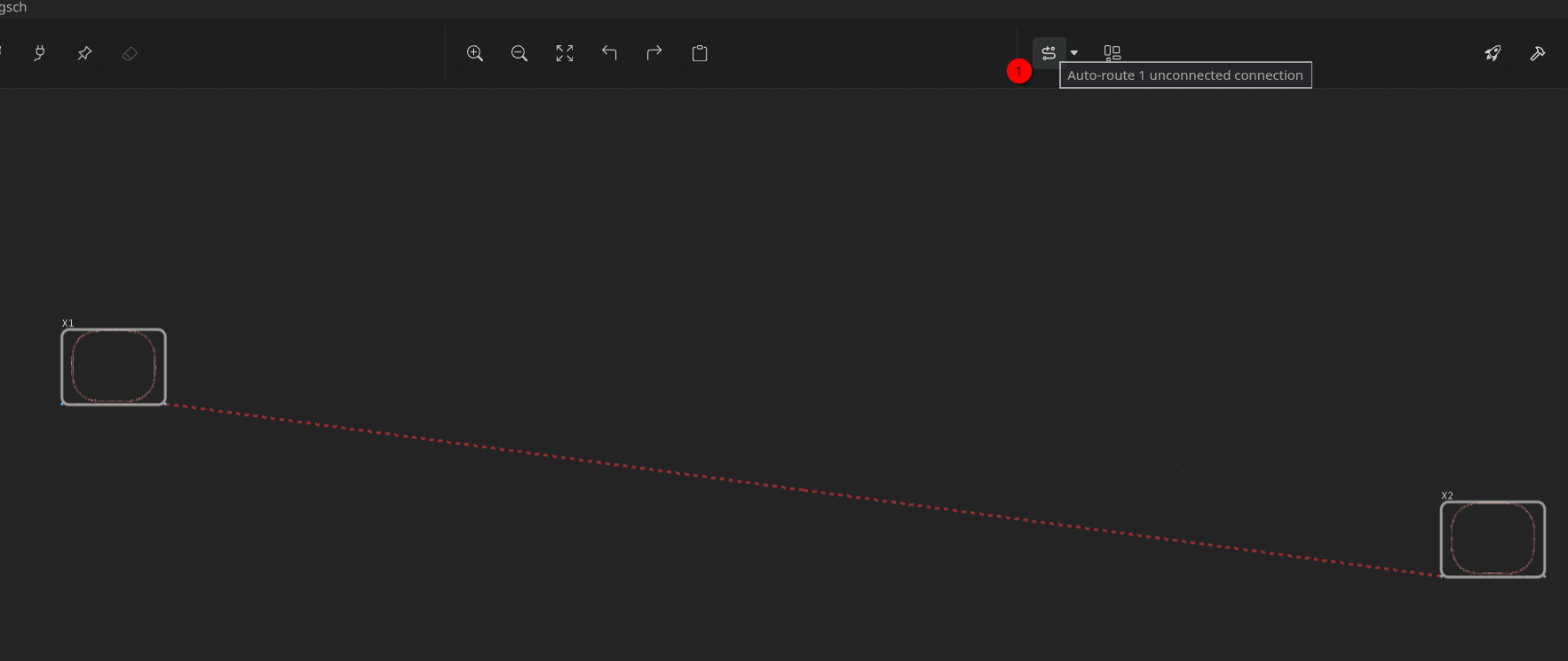
A connection counts as unconnected when it is a consecutive pair of ports on a net that is neither already routed nor butt-coupled. When there is nothing left to connect, the button is greyed out.
Routes selected — reroute the selection
Select one or more routes and the same button regenerates them instead, again with the count in the tooltip:
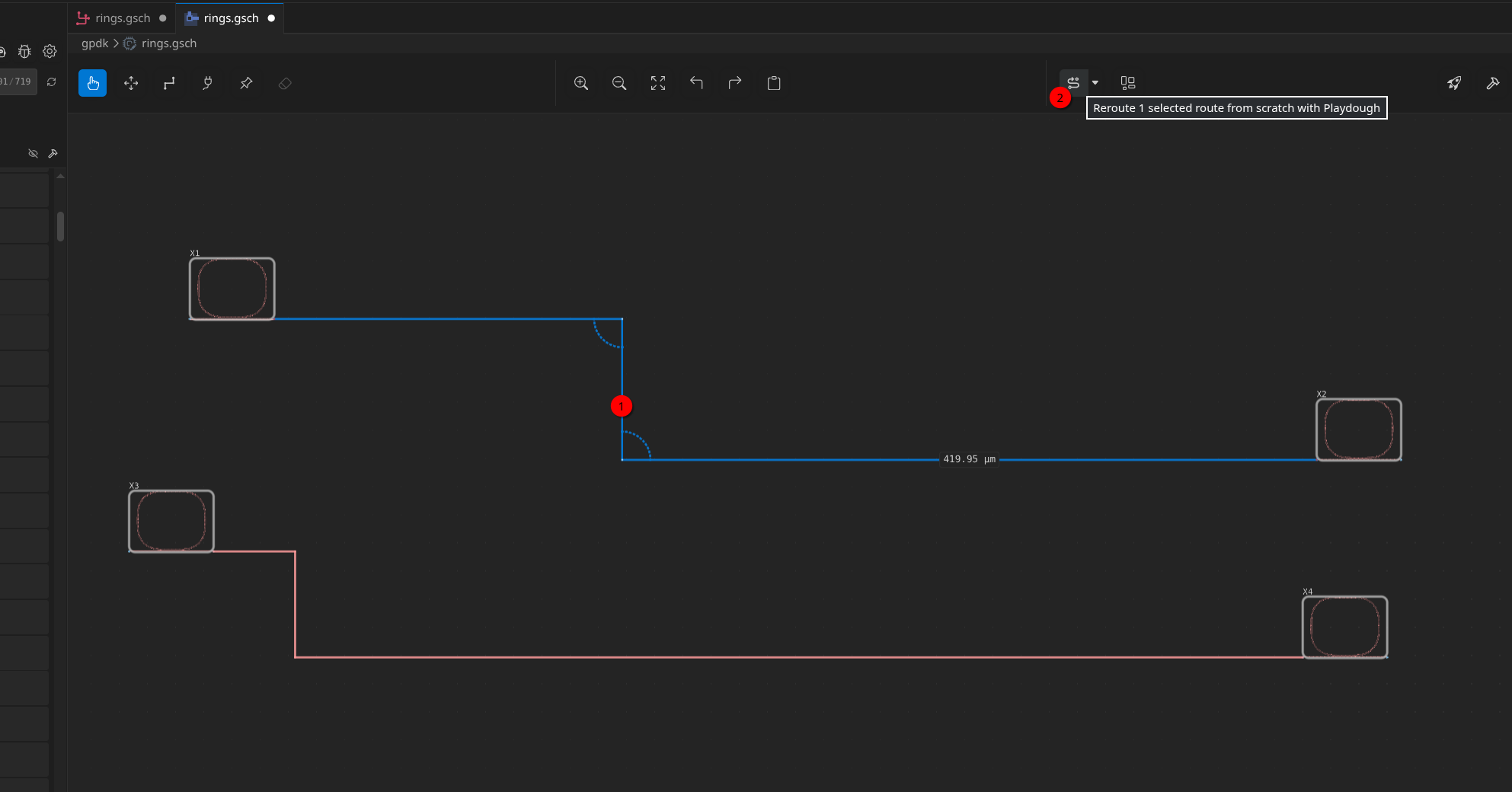
Rerouting starts from scratch
Rerouting a selected route discards its existing waypoints. It is a
complete regeneration from the two endpoints, not a refinement of the
geometry on screen. Any manual tweak — a detour you dragged around an
obstacle, a segment you nudged — is lost. Undo (Ctrl+Z / Cmd+Z) brings
it back.
The whole selection is sent to Playdough as a single initializer request rather than one call per route, so the normal routing operation can process the bundle together. This command does not read the optimization profile or optimizer controls in Advanced. It uses the clearance override.
Segments that are too short for their bend radius are flagged with an orange arc directly on the canvas.
The dropdown
The caret on the right half of the split button opens a dropdown with a Playdough | DoRoutes tab strip at the top. The Playdough tab lists the following commands:
| Item | What it does |
|---|---|
| Route all unconnected | Routes every unrouted pair, regardless of the current selection |
| Re-route selected (Manhattan) | Regenerates the selected routes from scratch |
| Route selected with profile | Uses the optimizer and PLM toggles; needs one route, or two when matching is enabled |
| Router Settings… | Opens the router panel |
The DoRoutes tab lists Route all unconnected and Re-route selected, which use the DoRoutes router.
Commands that have nothing to act on stay in the menu but are disabled, with the reason as a tooltip — so the list never changes shape under you. In the screenshot above, Route all unconnected is greyed out because everything in the schematic is already routed. Route selected with profile uses the same route-equality icon as the context-menu action, beside its text label.
Router Settings
Router Settings… opens a floating panel over the canvas. Route selected with profile reads the last applied settings at the moment it runs; the initializer commands do not consume optimizer settings; they still use the clearance override. No command prompts, and there is no per-command configuration hiding elsewhere.
Settings are per-session
The panel lives in memory for as long as the editor is open. It is not
written to the .gsch file, to your project settings, or anywhere else.
Close and reopen the schematic and the panel starts with the Fast
profile and no Advanced overrides.
Apply saves settings without closing the panel. OK saves and closes. Cancel discards edits since the last Apply (or since opening if nothing was applied). Routing uses the last applied settings.
Persistent per-project routing defaults — Default cross-section, Default bend, and Default bend radius (µm) — can be set in GDSFactory+ Settings → Livewire. These values are written to pyproject.toml and applied when no per-session override is in effect. Clearing a field and pressing Save removes its project default from pyproject.toml, restoring the normal fallback for that setting.
Optimization profiles
The primary controls are Routing profile, Enable optimizer, Use existing routes, and Enable path length matching. With the optimizer off, the settings action regenerates Manhattan routes and discards their waypoints. With the optimizer on, Use existing routes controls the starting geometry. It is on by default in every profile: optimization starts from the polylines on screen. Turn it off to discard existing waypoints and initialize fresh routes before optimization or PLM. With PLM on, matching can add detours.
Use existing routes is disabled and shown off while the optimizer is off, because the Manhattan initializer always starts fresh. Re-enabling the optimizer restores the stored choice. Profile selection and Restore profile restore Use existing routes to on; Cancel retains the last applied choice.
The initial profile is Fast, with the optimizer enabled and PLM disabled. Profiles set optimizer effort only; Enable path length matching is a separate toggle that keeps its value when you pick or restore a profile. The routing action says whether it will match lengths: Match path lengths with Fast with the optimizer and PLM on, otherwise Route selected with Fast. Applying edited settings adds (Custom): Route selected with Fast (Custom). The progress notification uses the same wording and italicizes the profile name and Custom together.
| Profile | Optimizer | max_steps |
lr |
length_matching |
route_collision |
obstacle_collision |
min_radius_violation |
|---|---|---|---|---|---|---|---|
| Fast | on | 5000 | 1.0 | 4.0 (PLM only) | 5.0 | 5.0 | 1.0 |
| High Effort | on | 50000 | 0.1 | 4.0 (PLM only) | 5.0 | 5.0 | 1.0 |
These are optimization budgets and weights, not guarantees of runtime, exact length equality, collision-free geometry, or valid physical fabrication geometry.
The Routing profile heading has its dropdown on the row below, with the compact blue Restore profile button on the right. General contains the object clearance field, followed by Optimizer settings and the three mode toggles. These remain accessible while Advanced is collapsed. Raw optimizer, cost-weight and bend-matching controls are in the collapsed Advanced section. Selecting a profile resets all three toggles, clearance, and Advanced overrides. Restore profile does the same without changing the selected profile. A modified indicator shows when toggles or overrides change the effective configuration. Clearing an optional field removes its override; required profile fields continue to have a valid effective value while an input is temporarily empty or invalid.
Apply saves the current profile and overrides; OK also closes the panel. Cancel discards unapplied edits. The routing progress window has a Cancel button that stops the current router task without changing the routes.
Path length matching
Drives the selected routes towards a common modeled path length — the classic use case being an interferometer or a set of delay lines that have to arrive in phase.
The action is available from the route and selection context menus and the routing dropdown. PLM requires at least two selected routes. The context-menu action is icon-only: two routed paths with an equality mark, with an accessible name and hover tooltip. The dropdown keeps its text label and shows the same icon beside it.
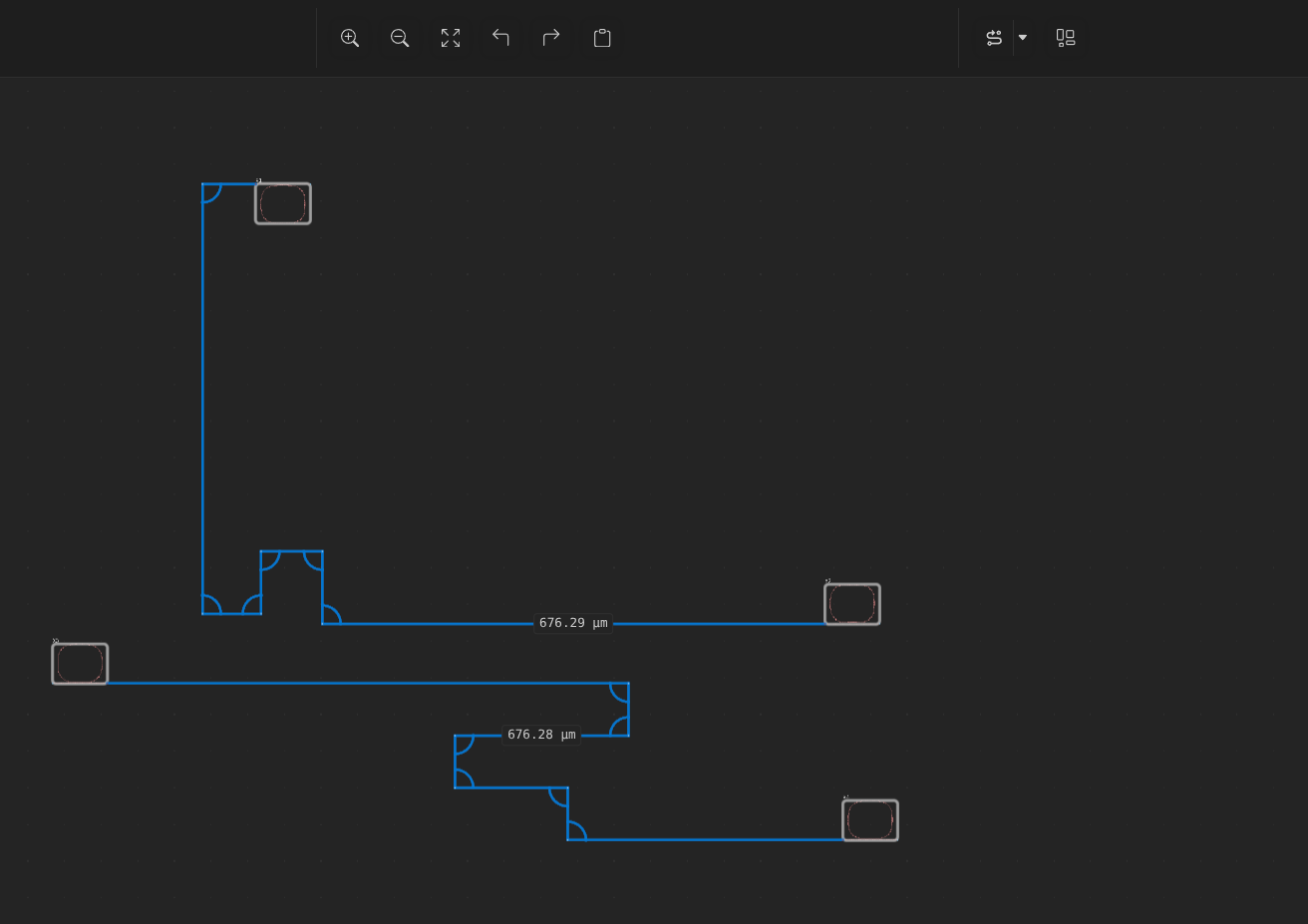
There is no group editor. The group is the selected routes. A request with fewer than two routes has nothing to match and the command is disabled. If you want two specific routes matched, select exactly those two, enable the optimizer and PLM in Router Settings, apply the settings, and choose Route selected with profile.
With Use existing routes on, matching sends each selected route's complete current polyline to Playdough. With it off, matching initializes fresh routes from the endpoints before optimizing. Both modes preserve endpoint pairing while allowing the optimizer to adjust the geometry and add necessary detours.
The matching operation always enables ensure_min_dof, so a route without an
interior degree of freedom can receive a necessary detour. This is fixed by the
operation and is not an editable Advanced field.
The following controls are in Advanced:
| Control | Meaning |
|---|---|
| Match bend counts | Also equalise the number of bends per route, not just the length |
| Detours per route (0 = automatic) | Force this many excursions per route to absorb slack. 0 lets Playdough add them where they are needed |
| Detour shape | Choose a compact corner detour (+2 bends) or a loop on a straight segment (+4 bends). Automatic tries both and keeps the better result |
| Maximum bends (empty or 0 = automatic) | Limit the bends permitted while Playdough retries an unmatched group. An empty field or 0 uses the group's initial bend count plus four; setting it to the current count disables those retries |
The profile supplies the optimizer budget and the matching/collision weights; Advanced can override them for users who need raw Playdough controls.
Advanced
The Advanced section is a direct reference to Playdough's optimizer configuration. Labels use natural language; hover over a label or input for an explanation followed by its exact Playdough argument name. Empty profile fields fall back to the selected profile; empty optional fields outside the profile are omitted from the request, so Playdough uses its own default. The placeholder shows that default.
Cost weights
Only length_matching belongs to the Path length matching cost subsection.
Its label and value field are disabled and greyed out when PLM or the optimizer
is off. Stored overrides return when re-enabled. All other weights, including
lengthening, remain usable with PLM off. Disabling the optimizer gates all
optimizer and matching controls; clearance stays active for initialization.
A higher weight makes the optimizer favour that goal more strongly. The first four values below are the Livewire profile defaults; the remaining values use Playdough defaults unless overridden.
| Setting | Default | Effect |
|---|---|---|
length_matching |
4.0 | Pulls the selected routes toward the same modeled length. |
route_collision |
5.0 | Keeps routes apart from one another. |
obstacle_collision |
5.0 | Keeps routes outside obstacle keep-out zones. |
min_radius_violation |
1.0 | Penalises bends tighter than the requested minimum radius. |
lengthening |
0 | Prefers shorter routes. |
uniformity |
0 | Evens the segment lengths within each route. |
non_manhattan |
2 | Keeps segments axis-aligned. It has no effect while manhattan_constrained is on. |
bending |
0 | Prefers fewer, gentler turns. It has no effect while manhattan_constrained is on. |
radius_mismatch |
0 | Experimental. Pulls bends toward target_radius, rather than only enforcing min_radius. |
route_ordering |
0 | Experimental. Preserves the original route order to discourage crossings and swaps. |
anchor_proximity |
0 | Experimental. Pulls routes toward supplied anchors. Livewire does not currently supply anchors, so this setting has no effect. |
port_straightening |
0 | Deprecated. Favours a longer straight run out of each port before the first bend. Avoid it in new work. |
Optimizer
| Setting | Default | Effect |
|---|---|---|
max_steps |
selected profile | Optimization budget: 5000 for Fast and 50000 for High Effort. |
manhattan_constrained |
on | Keeps an axis-aligned route axis-aligned while tuning. Turn it off only when diagonal refinement is wanted or necessary. |
ensure_min_dof |
automatic | Enabled for PLM to allow matching detours; disabled for optimizer-only routing. This indicator is read-only. |
internal_pivots |
auto | Sets how many interior points the optimiser may move. It is disabled while manhattan_constrained is on, because those extra points would be collinear and collapsed. |
lr |
selected profile | Optimizer step size: 1.0 for Fast and 0.1 for High Effort. |
optimizer |
adam |
Chooses adam or sgd. |
tol |
1e-6 | Minimum improvement that counts as progress. It matters only with patience. |
patience |
unset | Number of consecutive non-improving steps allowed before stopping early. Leave empty to use all max_steps. |
step_clip |
unset | Maximum distance geometry may move in one step, in µm. Set it to tame an unstable run. |
normalize_costs |
on | Scales goals comparably, so a weight has roughly the same meaning across layouts. |
One trap worth knowing: lengthening and length_matching pull against each
other. lengthening penalises absolute path length, while length_matching
works by lengthening the short routes in a bundle. Neither is clamped, so a
large lengthening weight will happily produce routes that are short and not
matched.
Initializer and optimizer boundaries
Route all unconnected and Re-route selected (Manhattan) use the Manhattan initializer only. They do not consume the optimization profile or the optimizer controls in Advanced; both use its clearance override. Route selected with profile chooses initialization, optimization, or matching and reads the last applied profile and overrides when it runs, whether invoked from the dropdown or a context menu.
The optimization objectives are soft costs over Playdough's modeled geometry. They are useful for routing and matching, but they do not certify exact path lengths, collision-free routes, bend-radius compliance, or valid physical fabrication geometry. Inspect the resulting routes and use the project's design-rule checks where physical validity matters.